Traditional vs Digital Drawing: A Honest Guide for Artists at Every Level
Every artist eventually faces the same question — paper or tablet? It sounds simple, but the answer shapes how you learn, work, and grow as a creative. Both methods have passionate supporters, and both have real weaknesses that nobody talks about enough.
This guide breaks down the actual differences between traditional and digital drawing — not to declare a winner, but to help you figure out which fits your goals, lifestyle, and budget right now.
What Traditional Drawing Actually Means
Traditional drawing means creating art with physical materials — pencils on paper, charcoal on canvas, ink on bristol board. No software, no screens, no undo button. The tools are straightforward: graphite pencils for sketching and shading, charcoal for dramatic portraits, ink pens for clean line work, and watercolors or markers for color. Your sketchbook becomes your studio — portable, always ready, needing nothing but light.
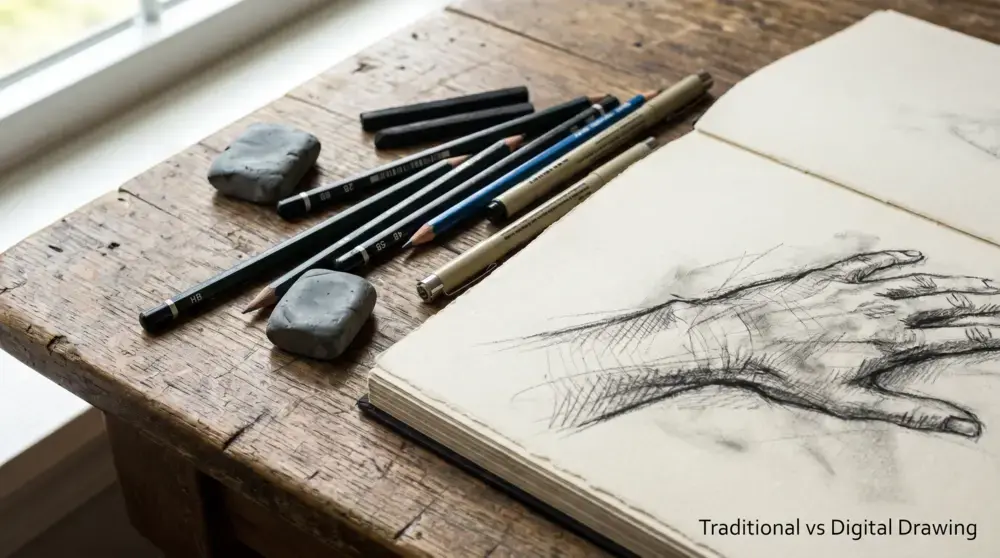
What makes traditional drawing powerful is what it demands from you. Every mark is permanent (or at least costly to fix), which forces a kind of intentional thinking that digital art rarely requires. You plan before you draw. You commit to decisions. Over time, this builds something invaluable — genuine hand-eye coordination and a deep understanding of how light, form, and proportion actually work. Many experienced artists still recommend starting on paper for exactly this reason. The fundamentals you absorb through physical drawing — shading, perspective, line weight, composition — don’t belong to any medium. They transfer everywhere.
What Digital Drawing Actually Means
Digital drawing happens on a screen using a stylus or pen, with software handling everything from brushes to color mixing to file management. The hardware varies — dedicated drawing tablets like Wacom devices, screen tablets where you draw directly on the display, or an iPad Pro with an Apple Pencil. The software side is equally varied. Procreate is the go-to for iPad users. Clip Studio Paint dominates comic and manga illustration. Adobe Photoshop remains the industry standard for professional commercial work.
The defining feature of digital art is flexibility. Layers let you separate your sketch from your line art from your coloring. The undo function lets you experiment without fear. Brushes can simulate pencil, ink, watercolor, or oil paint — and you can switch between them instantly. Color testing takes seconds instead of minutes. For professionals working on tight deadlines or handling frequent client revisions, these aren’t small conveniences. They’re the difference between a sustainable workflow and constant stress.
Learning Curve: Which Is Actually Easier to Start With?
This depends on what “easier” means to you.
Traditional drawing has a lower technical barrier. You pick up a pencil and draw. No settings to configure, no software to learn, no device to charge. Beginners can focus entirely on the craft — observing shapes, understanding light, building muscle memory. Mistakes are visible and educational rather than instantly erasable.
Digital drawing adds a technical layer on top of learning art itself. New users often spend their first sessions adjusting brush settings instead of actually drawing. The disconnect between hand movement and screen response (especially on screenless tablets) can feel genuinely frustrating at first.
That said, digital tools reduce the fear of failure. When mistakes cost nothing to fix, beginners tend to experiment more and practice longer. The undo button, love it or criticize it, keeps people drawing instead of giving up.
The honest answer: Traditional is better for learning foundational skills. Digital is more forgiving while you’re learning. The ideal path — one that many professional artists actually took — is to start traditionally and add digital tools once you understand the basics.
Cost Breakdown: What You’ll Actually Spend
Starting Out
Traditional drawing is genuinely cheap to begin. A decent sketchbook, a set of graphite pencils, an eraser, and a sharpener cost under $20. You can start today. Digital drawing requires real investment upfront. A basic entry-level tablet (like a Wacom Intuos) starts around $80–100. An iPad capable of running Procreate well costs several hundred dollars. Add a stylus, a case, maybe a stand. Some software runs on monthly subscriptions.
Long-Term Costs
Here’s where it gets interesting — and where people often get surprised. Traditional art has ongoing supply costs that never stop. Paper, pens, markers, charcoal, and specialty materials need constant replenishing. Professional-quality supplies cost considerably more than beginner materials. Digital art has largely one-time hardware costs, but technology ages. Tablets slow down, batteries degrade, software updates demand newer hardware. Professionals typically replace or upgrade devices every few years. Neither is dramatically more expensive over a decade of serious use. But traditional art costs are predictable and gradual, while digital costs come in larger, less frequent chunks.
Editing and Flexibility: The Real Difference
This is where digital drawing wins clearly and without much debate. Layers alone change everything. Being able to sketch on one layer, ink on another, color on a third — and adjust each independently — is a workflow advantage that has no traditional equivalent. The ability to resize, flip, rotate, or completely recolor a piece in seconds would take hours by traditional methods.
The undo function gets criticized sometimes as a crutch, but that’s largely unfair. It reduces anxiety during learning and speeds up professional workflows. The artists who produce the most work tend to be the ones who can iterate quickly. Traditional drawing’s lack of flexibility is also its character. There’s a reason collectors pay premiums for original artwork. Physical imperfections — a slight variation in ink pressure, the grain of paper showing through charcoal — give traditional art a visual warmth that digital work, even at its best, replicates rather than replicates.
Texture and Visual Feel
Modern digital art software is impressively good at simulating traditional media. Procreate’s pencil brushes feel genuinely close to graphite. Clip Studio’s watercolor tools capture the bloom of wet paint with surprising accuracy. Texture overlays can add paper grain to digital work convincingly. But “convincingly close” and “identical” aren’t the same thing.
Traditional artwork has a physical quality — tiny inconsistencies, the actual tooth of paper, the way ink pools slightly at the end of a stroke — that gives it a warmth most viewers respond to emotionally, even if they can’t articulate why. For practical purposes, this distinction matters less than it once did. Digital art is now completely accepted across publishing, entertainment, gaming, and advertising. Whether your illustration was made with a brush or a stylus rarely affects how clients or audiences receive it.
Speed and Professional Workflow
For commercial work, digital drawing is faster. Not slightly faster — significantly faster. A digital illustrator can receive a brief in the morning, sketch options by noon, revise based on feedback by afternoon, and deliver final files by evening. The same project done traditionally would require scanning, potential color correction, and physical delivery logistics.
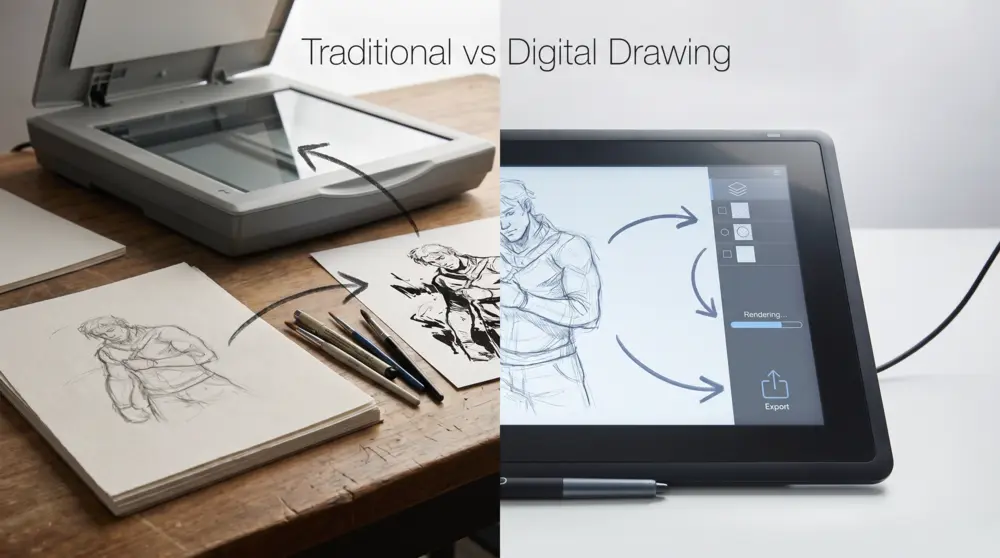
Client expectations have shifted accordingly. Most commercial clients now expect editable files and quick revision turnaround. Digital workflows are simply better suited to this reality. That said, traditional artists who’ve built their reputation around physical work — portrait commissions, gallery paintings, fine art collectors — aren’t at a disadvantage. Their market values the physical object specifically. The premium is real.
Portability: Drawing Anywhere
A sketchbook wins here, and it’s not particularly close. A pencil and small sketchbook fit in any bag, work in any lighting, never run out of battery, and don’t require a Wi-Fi connection to save your work. For quick observational sketches, life drawing, or travel journals, there’s nothing more convenient.
Digital drawing’s portability has genuinely improved — an iPad and Apple Pencil is a legitimate mobile studio — but you’re still managing battery life, storage, connectivity, and the risk of dropping an expensive device. For daily sketch habits and outdoor drawing practice, most artists find traditional tools faster and less stressful. For finishing and delivering professional work from anywhere, digital wins.
Career Paths: Which Medium Leads Where
Traditional drawing is particularly valued in:
- Fine art and gallery work
- Portrait commissions (especially physical originals)
- Tattoo design
- Teaching foundational art skills
- Collectors’ markets
Digital drawing dominates in:
- Game concept art and character design
- Animation and motion graphics
- Editorial and commercial illustration
- Comic books and graphic novels (increasingly)
- Advertising and branding
- Social media content creation
Many creative careers use both. A concept artist might sketch thumbnails on paper over morning coffee, then develop and render them digitally. A children’s book illustrator might ink traditionally and color digitally. The division between mediums has become more porous as hybrid workflows have proven themselves.
The Hybrid Workflow: Why Most Pros Use Both
The most productive question isn’t “traditional or digital?” — it’s “how can I use both effectively?”
A common professional workflow: rough ideas sketched quickly on paper → scan or photograph the sketch → refine digitally. This captures the natural looseness of hand drawing while taking advantage of digital editing speed. Other artists work in reverse: thumbnail compositions digitally for speed, then produce finished artwork traditionally for texture and warmth.
Starting a hybrid practice doesn’t require expensive gear. A basic sketchbook, a mid-range pencil set, and an entry-level tablet cover most needs for beginners exploring both worlds.
Making the Switch: Traditional to Digital
The most common frustration when transitioning from paper to tablet is coordination. On a screenless tablet, your hand moves in one place while you watch the result on a monitor — a disconnect that takes real adjustment time. Most artists report it feeling natural within two to four weeks of consistent practice. Screen tablets and iPads eliminate this disconnect entirely, which is one reason they’ve become so popular despite the higher cost.
What carries over directly from traditional practice:
- Understanding of light and shadow
- Compositional instincts
- Anatomy and proportion knowledge
- Perspective drawing
- Color theory
What you’ll need to learn fresh:
- Software navigation and shortcuts
- Layer workflow management
- Digital brush behavior and settings
- File formats and export settings
Go slowly with software at first. Pick one program, use a minimal set of brushes, and focus on drawing — not on exploring every feature. Technical complexity is the biggest reason new digital artists lose momentum.
Environmental Considerations
Neither method is fully clean, and both have trade-offs worth acknowledging. Traditional art consumes paper continuously, along with inks, solvents, and disposable supplies. Some materials — certain markers, oil paints, chemical-based mediums — require careful disposal.
Digital art avoids most consumable waste but contributes to electronic waste. Tablets, styluses, and devices have finite lifespans and are difficult to recycle. Data centers powering cloud storage and software subscriptions carry their own energy costs. Consciously choosing reusable traditional tools, or extending the life of digital devices rather than upgrading unnecessarily, reduces impact on both sides.
So Which Should You Choose?
Choose traditional drawing if:
- You’re learning foundational skills and want maximum focus on craft
- Budget is tight and you want to start immediately
- You enjoy tactile, hands-on creative work
- You’re pursuing fine art, portrait commissions, or gallery work
- You draw primarily for personal pleasure rather than commercial production
Choose digital drawing if:
- You’re aiming for commercial illustration, gaming, animation, or publishing
- Client revision speed and file delivery matter to your workflow
- You want to build a portfolio for online platforms quickly
- Editing flexibility and experimentation are priorities
Choose both — eventually — if:
- You’re serious about a long-term creative career
- You want the most adaptable skill set possible
- You enjoy how different mediums stretch different artistic muscles
The artists who tend to go furthest are the ones who refuse to limit themselves to one camp. They learned the fundamentals on paper, adapted them digitally, and built workflows that pull from both.
Frequently Asked Questions About Traditional vs Digital Drawing
Is digital art cheating? No. Digital tools don’t draw for you — they change how you draw. Every compositional decision, every stroke, every color choice still comes from the artist. Strong fundamentals matter just as much digitally as they do on paper, often more, because software won’t compensate for weak anatomy or poor composition.
Should beginners start traditionally or digitally? Most art educators recommend starting traditionally, primarily because it removes technical complexity and forces you to develop genuine hand skills. That said, if your specific goal is digital illustration for commercial work, starting digitally is completely valid — just be intentional about building fundamentals rather than relying on undo and redo.
Can digital art look exactly like traditional art? Close, but experienced eyes can usually tell. Modern software simulates traditional textures remarkably well, and the gap continues to narrow. For most practical and commercial purposes, the distinction rarely matters to clients or audiences.
What’s the best tablet for a beginner? A Wacom Intuos is a reliable, affordable starting point for screenless tablets. For a screen tablet experience without the high cost, the iPad (even non-Pro models) with an Apple Pencil is widely recommended. Avoid buying the most expensive option before you know how much you’ll actually use it.
Does traditional drawing make you better at digital art? Yes — significantly. Artists who develop their fundamentals on paper consistently adapt to digital tools faster and produce stronger work. The skill set is the same; only the medium changes.